A free Chrome extension that bulk invites everyone who liked or reacted to your Facebook Page's posts to follow your Page
Free Chrome extension · Manifest V3
Most invite tools want to go fast. This one wants you to still have a Page tomorrow
It invites everyone who reacted to your posts — Like, Love, Haha, all of them — to follow your Page. That part's easy. The hard part, and the entire reason this thing exists, is knowing when Facebook has quietly decided you're a robot, and stopping before it makes that official.
No account · no server · runs on your machine · clicks politely
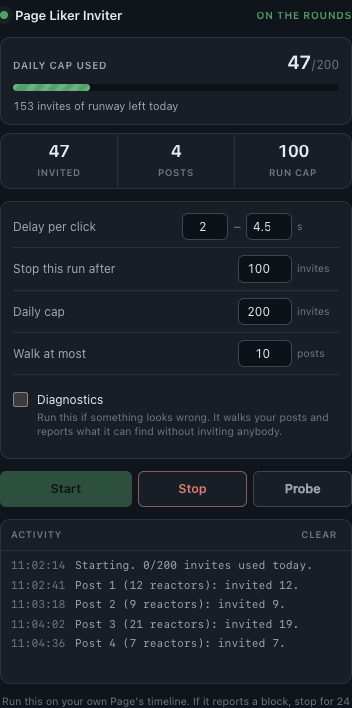
The panel, mid run. Diagnostics is there for when something looks wrong.
What it actually does
They liked your post. They still don't follow your Facebook Page.
Someone hit Like on your post. Or Love, or Haha, or Wow — the tool doesn't care which. That person likes your stuff and hasn't followed your Page yet, which is the warmest audience you will ever have, and Facebook buries the button that fixes it three clicks deep behind every individual post.
This clicks it. Post by post, reactor by reactor, until it's done or until something looks wrong.
- Walks your Page's recent posts — up to 10 per run, your call
- Opens each post's reaction list — every reaction type, not just Likes
- Invites everyone not already invited — rows marked Invited are skipped
- Stops — on a cap, a block, or your Stop button
Why it exists
Anybody can write a loop.
The loop isn't the product. The brakes are. Four of them, running the entire time, all independent, any one of which will end your session without asking how you feel about it.
Block phrases
Checked before every click and after every click. Both, because Facebook likes to spring the bad news on the click itself. One match and the run is over. Not paused. Over.
Randomized pacing
Never the same gap twice. A perfectly consistent 3-second click is the most obvious tell a bot has ever left. Humans are sloppy. Be sloppy.
Independent caps
One for the run, one for the day. The daily one persists across runs and resets at midnight, so you can't outsmart it by quitting and reopening. Either cap ends the session.
Clicks in Diagnostics
When something looks wrong, Diagnostics walks every post, opens every dialog, and sends absolutely nothing — so you can find out what broke without spending a single invite finding out.
How a run works
Four steps. Every one has to pass before the next one starts.
It walks your own Page's own posts.
Your posts. Your Page. Not shared posts, not other Pages, not comments. The narrowest possible blast radius, on purpose.
It opens the reaction list and asks again.
That list is virtualized, which is a fancy way of saying the rows destroy themselves the second they scroll out of view. So nothing is ever cached across a scroll. It re-queries every pass, which is why it can't invite a ghost twice.
It invites one person at a time, at human speed.
Anyone already marked Invited gets skipped. Every selector is anchored to an aria-label instead of a class name, because Facebook's class names are generated nonsense that rotate whenever they feel like it.
It stops. Immediately. On the first bad sign.
A throttling message, either cap, or your Stop button. Any of them ends it right there. There's no retry loop, no "let's try once more," no second opinion. The one behavior that turns a 24-hour timeout into a dead Page is arguing with it, and this thing doesn't argue.
Read this before you install it
Automating Facebook's interface violates their Terms of Service. That's true even though the Invite button is a completely legitimate button you're allowed to click with your own finger a thousand times a day. Every safety measure on this page lowers your risk. Not one of them removes it.
- Possible consequences include a temporary feature block and — if you push through one — a restricted Page.
- If it reports a block, stop for 24 hours. Restarting into a soft block is exactly what escalates it into something permanent.
- If a run invites nobody, run Diagnostics before retrying. The panel will tell you to. Repeatedly restarting a run that's silently failing is a good way to attract attention you don't want.
- Uninstall any other invite extension first. Two scripts clicking the same buttons will double-click rows, and you'll have no idea which one got you blocked.
- The default caps are low on purpose. You can raise them. Raising them raises your risk, and that trade is yours to make, not mine.
Use at your own risk.
Install
Loads unpacked. Nothing leaves your machine.
No account. No server. No telemetry. The extension talks to the Facebook tab you already have open and to nothing else in the world.
- Download the extension and unzip it somewhere you'll keep it
- Open chrome://extensions
- Turn on Developer mode, top right
-
Load unpacked, pick the unzipped folder — the
one with
manifest.jsonin it - Open your Page and reload the tab — content scripts only inject on load, so an already-open tab won't work
- Click the icon, check the caps look right, hit Start
storage — caps + settings, stored locally
activeTab — the tab you're already looking at
# host access
https://www.facebook.com/*
# everything else
— none —
Questions
Before you ask.
Is it fast?
No. On purpose. Somewhere between 2 and 4.5 seconds passes before every single click, randomized. Tools that advertise their speed are advertising how quickly they can get you blocked. They just haven't phrased it that way.
Does it do comments and shares too?
No. It invites people who reacted to your posts, and that's the entire feature list. Not commenters, not sharers, not people who reacted to a post someone else shared. One narrow job, done carefully, is the whole pitch — every extra surface it touched would be another way to get you blocked.
Will this get my Page banned?
It can. Automating the UI breaks Facebook's rules and no amount of careful pacing makes that a zero. What this thing does is stop at the first warning instead of powering through it — and powering through it is the thing that turns "come back tomorrow" into "come back never."
Why is it free?
Because I'm a nice dude. It's a pile of JavaScript that runs inside your own browser — there's no server to pay for and nothing to sell you. Free also means I don't have to promise you volume to justify a price tag, which is convenient, because the honest pitch is a list of limits. Follow me on X for more freebies.
What is Diagnostics?
A test run. It walks your posts and opens every reaction list exactly like a real run, but sends nothing — so if the extension stops inviting people, it tells you whether it can still see the posts and the buttons. The readout changes from "Invited" to "Would invite" so you can't mistake it for the real thing, and it doesn't touch your daily cap. The panel suggests it on its own when a run finishes without inviting anyone.
What happens when Facebook changes their markup?
They will. Selectors are anchored to aria-labels rather than generated class names, which is the sturdiest handle available — but sturdy isn't permanent. When something does break, the run finishes having invited nobody and the panel says so, then tells you to run Diagnostics — which reports exactly what it can and can't still find. Loud beats silent.
Does it collect anything?
No. No server, no analytics. Your settings and daily count sit in local extension storage, and the history gets trimmed to the last 14 days. That's the whole data story.